Description
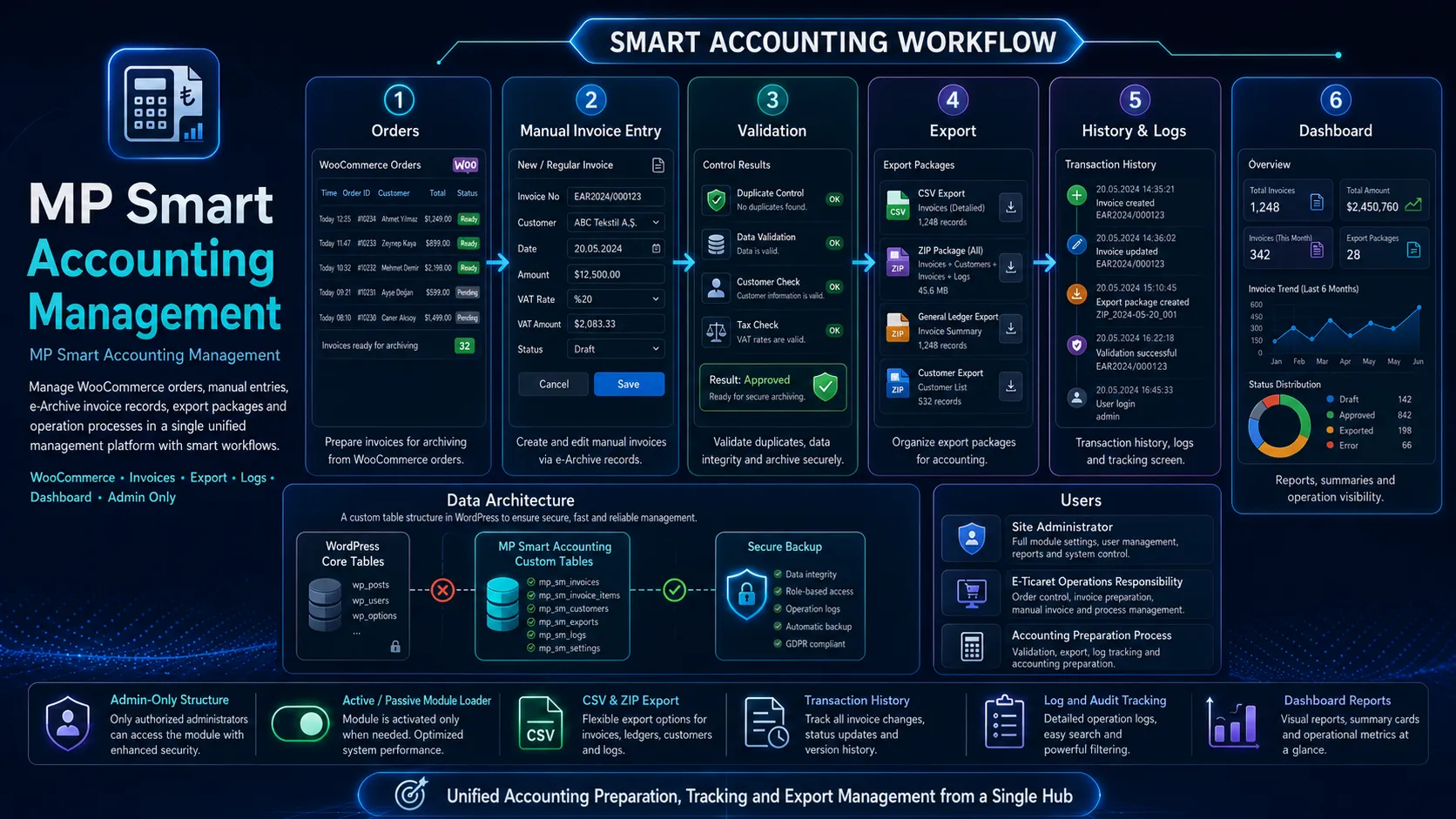
MP Accounting Manager is an independent accounting tracking module that works inside the WordPress admin area and manages WooCommerce orders, manual GİB/e-Archive invoice records, accountant export packages, and transaction history through a custom table architecture.
1. General Purpose
MP Accounting Manager is an admin panel-focused preliminary accounting and invoice tracking module developed for businesses using WordPress and WooCommerce infrastructure. The purpose of the module is not to issue invoices; it is to organize the tracking, recording, control, export, and accountant handover process between WooCommerce orders and invoices created through GİB/e-Archive.
For businesses that create invoices especially through the manual GİB/e-Archive portal, tracking the order-invoice connection becomes difficult over time. Questions such as which order has been invoiced, which invoice has been sent to the accountant, which record is waiting for review, and which invoice was exported before are usually tracked with Excel, folder notes, or manual archives. MP Accounting Manager moves this process into a centralized and traceable structure within the WordPress admin.
Short Value Proposition
A manageable module that tracks WooCommerce orders and GİB/e-Archive invoice processes in a single panel, works quickly with a custom table architecture, reduces duplicate invoice number risk, and produces a single export package for the accountant.
2. Problem and Need
In WooCommerce stores, the order process is digital; however, in many businesses, the invoice issuing process is still carried out manually through the GİB/e-Archive portal. This causes order and invoice data to exist in two different places. The order is inside WooCommerce, the invoice is on the GİB side, and the PDF archive may be stored on a computer, in the cloud, or in external storage.
This creates the following operational problems:
- The same order may be invoiced again by mistake or assumed to be uninvoiced.
- GİB invoice number information may not be associated with WooCommerce orders.
- Monthly data to be sent to the accountant may need to be collected from scattered files.
- The storage location of invoice PDF files may not be traceable.
- Invoice number, customer, VAT, and total amount information may be tracked manually in Excel files.
- Previously exported invoices may get mixed into the accounting package again.
- Errors, duplicates, or records requiring review may not be tracked centrally.
MP Accounting Manager gathers these needs under a single admin-only module and makes the site manager’s daily invoice operation systematic.
3. Product Vision and Positioning
The module is not an e-invoice integrator in the traditional sense. Its first-phase purpose is not to issue invoices, but to make the invoice tracking operation reliable. This positioning is deliberately chosen because invoice issuing processes may vary depending on country, regulations, private integrators, the GİB portal, and company scenarios. However, order-invoice matching, duplicate control, record archiving, export packages, and logging are common needs for all businesses.
4. Core Architectural Approach of the Module
MP Accounting Manager is designed not as a plugin, but as an enable/disable module connected to the existing MP module loader system. In this way, when active, it loads its own admin menus, tables, export, and log system; when inactive, it does not create unnecessary load on WooCommerce, the frontend, or the WordPress core.
The main principles of the architecture are:
- Not bloating WordPress core tables with unnecessary post/meta data.
- Storing invoice and accounting records in a normalized way inside custom tables.
- Reading WooCommerce orders through WooCommerce API logic, not directly through SQL.
- Providing clear, simple, and operation-focused screens inside the admin panel.
- Storing export history and which invoices were included in which package.
- Preventing duplicate invoice number risk especially for active/approved records.
- Creating log records for every critical operation.
5. Main Features
| Feature | Description |
| Manual Invoice Record | Invoice information issued through GİB/e-Archive can be saved from the admin form. |
| Create Invoice from Woo Order | Customer, product, VAT, and total information from the WooCommerce order is automatically transferred to the New Invoice form. |
| Invoice Listing and Detail | Invoices can be filtered, and their details and line items can be viewed. |
| Invoice Editing | Incorrectly entered manual information can be updated securely; if exported records are edited, a warning is written to the log. |
| Duplicate Protection | The same invoice number cannot be saved again for approved and review-required active invoices. |
| CSV Export | Invoices to be sent to the accountant can be exported in CSV format. |
| ZIP Export Package | invoices.csv, invoice_items.csv, customers.csv, and manifest.json can be downloaded in a single ZIP file. |
| Export History | For each export operation, which invoices were included in the package is recorded. |
| Dashboard | Monthly totals, VAT, invoices waiting for export, missing Woo orders, and latest logs are monitored in one panel. |
| Logs | Transaction history, duplicate blocks, errors, warnings, and export records are tracked. |
| Settings | Seller company, default VAT, currency, invoice status, and export preferences are managed. |
6. WooCommerce Integration
WooCommerce integration is one of the most critical parts of the module. Orders are listed inside MP Accounting Manager, but the order source remains WooCommerce. When the module turns a WooCommerce order into an accounting record, it takes customer, product, VAT, payment, and total information with a snapshot approach.
- A WooCommerce order is created and the payment/order status becomes suitable.
- The order is listed on the MP Accounting > Woo Orders screen.
- For orders without an invoice, the “Create Invoice” button appears.
- When the button is clicked, the New Invoice form is filled with order data.
- The administrator enters the GİB/e-Archive invoice number and any missing tax information.
- The invoice is saved and matched with the Woo order ID.
Thanks to this integration, the order and invoice relationship is tracked in a separate mapping table. If there is an active invoice for the same order, the existing invoice is displayed on the Woo Orders screen instead of a new invoice creation button.
7. Invoice Management and Duplicate Protection
Invoice management is the center of the module. Invoices are not only saved; they are tracked together with their statuses, customer information, Woo matches, line items, export status, and log history. The system uses status management instead of physical deletion.
| Status | Meaning | Role in Duplicate Control |
| approved | Approved, active invoice | The same invoice number cannot be saved again |
| needs_review | Record requiring review but considered active | The same invoice number cannot be saved again |
| imported | Imported record | Can be approved or reviewed depending on the workflow |
| draft | Draft or incomplete record | The same invoice number can be entered again |
| archived | Archived/passive record | Excluded from export and duplicate control |
| cancelled | Cancelled record | Excluded from export and duplicate control |
The duplicate system specifically checks fields such as invoice number, ETTN/UUID, PDF hash, order ID, customer tax number, invoice date, and total amount. On the update screen, the current invoice ID is excluded from duplicate control; therefore the invoice does not conflict with itself, but if it conflicts with another active invoice, the update is blocked.
8. Export and Accountant Package
For the accountant, the most important need is to receive periodic data in an organized single package. MP Accounting Manager meets this need with both single CSV and ZIP package export. The ZIP package makes the accounting operation much more organized.
| File | Content |
| invoices.csv | Invoice header information, customer, tax number, date, totals, Woo order connection |
| invoice_items.csv | Invoice line items, product/service name, SKU, quantity, unit price, VAT, line total |
| customers.csv | Customers within the export scope, tax information, contact details, and invoice totals |
| manifest.json | Machine-readable summary about export date, filters, record counts, and package content |
Each export operation is saved to the history table. In addition, thanks to the export_items table, which invoices were included in which export package are permanently tracked. This allows the question “Has this invoice been sent to the accountant before?” to be answered through the system.
9. Dashboard, Logs, and Traceability
The dashboard is the module’s daily control panel. The purpose is not only to show statistics, but to help the site manager quickly see what needs to be done. The dashboard displays this month’s active invoices, VAT total, invoices waiting for export, records requiring review, and Woo orders missing invoices.
- Monthly active invoice count and total amount
- Monthly VAT total
- Invoices waiting for export
- Invoices requiring review
- WooCommerce orders missing invoices
- Latest export records
- Latest warning/error logs
The Logs screen is the audit layer of the module. Installation, invoice creation, invoice update, duplicate blocking, export download, export history record creation, and error records can be tracked from here.
10. Settings and Manageability
The settings screen allows the module to be configured according to the business. Company information, default currency, VAT rate, new invoice status, export status, ZIP export activation, and export limits are managed from this screen. Settings are stored in the WordPress options structure.
| Setting Group | Example Settings |
| Seller Company | Company title, tax number, tax office, email, phone, address |
| Invoice | Default currency, default VAT rate, default status for new invoices |
| Export | Default export status, maximum invoice/item/customer limit, ZIP active/passive |
| Security/Monitoring | Marking exported_at after export, log records, permission controls |
11. Security Approach
MP Accounting Manager is designed as an admin-only module. Even so, invoice and customer information is considered sensitive. Therefore, the core security approach is based on permission control, nonce verification, file/export access control, avoiding public file sharing, and logging.
- current_user_can-based permission control
- Nonce verification in form and export operations
- Screens accessible only to admin/authorized users
- Export history and transaction logs
- Status management instead of physical deletion
- Principle of not sharing sensitive files via public URLs
- Architecture suitable for token time limits and download logging infrastructure for future accountant access
12. User Scenarios
Scenario 1: Invoice Record from Woo Order
The order arrives in WooCommerce. The administrator clicks Create Invoice on the Woo Orders screen. The form is filled with order information. The GİB invoice number is entered and the invoice is saved.
Scenario 2: Manual Invoice Entry
An invoice without a Woo connection or tracked manually is saved directly from the New Invoice screen.
Scenario 3: Duplicate Blocking
If the same invoice number exists in another approved or review-status record, the system does not allow a new record or update operation.
Scenario 4: Period Export to Accountant
The month-end period is filtered and Download ZIP Package is selected. Invoices, items, and customers are exported as a single package.
Scenario 5: Reviewing Export History
A previously downloaded export record is opened and the invoices included in that package are displayed.
Scenario 6: Correcting an Incorrectly Entered Invoice
Customer, amount, invoice number, or item information is updated from the invoice edit screen; the operation is logged.
13. Marketing Value and Benefits
MP Accounting Manager simplifies the accounting preparation process for small and medium-sized WooCommerce businesses. The module strengthens the order-invoice tracking layer without changing the invoice issuing operation. For this reason, it adapts easily to the existing workflow.
| Benefit | Description |
| Time Savings | Invoice, customer, and item data are obtained from a single package during monthly accounting preparation. |
| Error Reduction | Reduces the risk of duplicate invoice numbers, missing invoices, and exported records being mixed in again. |
| Operational Transparency | The process becomes traceable through the dashboard, logs, and export history. |
| Performance | With custom table architecture, it does not burden the WordPress post/meta structure in large datasets. |
| Adaptability | It can be enabled/disabled when desired through the module loader architecture, not as a plugin. |
| Growth Potential | It provides a core ready for current account, expense, collection, PDF import, and integration phases. |
14. Competitive Advantages
Many solutions on the market either try to become full e-invoice integrators or store limited meta records inside WooCommerce. The difference of MP Accounting Manager is that it treats the accounting operation as an independent and modular tracking engine inside the WordPress admin.
- Architecture dependent on WooCommerce but not embedded in WooCommerce tables
- More controlled data structure for reporting and export with custom tables
- Strong traceability with export history and export_items relationship
- Duplicate control that separates active/passive invoices according to accounting logic
- PDF location note/archive approach without requiring permanent storage of the GİB PDF file
- A structure that is simple in the first phase and can grow into a mini preliminary accounting system in later phases
15. Phase Plan and Development Roadmap
| Phase | Scope | Goal |
| Phase 1 | Custom table, manual invoice, Woo matching, duplicate, list/detail/editing, CSV/ZIP export, export history, dashboard, logs, settings | Solid core and daily operation infrastructure |
| Phase 2 | PDF import, PDF parsing, bulk import, export report PDF, secure download link | Automating GİB PDF processes |
| Phase 3 | Current account, collection tracking, expense tracking, VAT reports, payment method analyses | Expanding preliminary accounting functions |
| Phase 4 | E-invoice/e-archive services, Logo/Mikro/Paraşüt-compatible export, API, accountant portal | Integration and advanced productization |
16. Technical Table Summary
| Table | Purpose |
| wp_mpam_invoices | Invoice header records, status, customer, totals, Woo order relationship, exported_at |
| wp_mpam_invoice_items | Invoice line items, product/service, quantity, unit price, VAT, and line totals |
| wp_mpam_customers | Customer information, tax number, address, and contact fields |
| wp_mpam_woo_map | Invoice and WooCommerce order matching and order snapshot information |
| wp_mpam_exports | Export history records, filters, file name, hash, totals, and counts |
| wp_mpam_export_items | Invoice ID and summary information included in each export package |
| wp_mpam_logs | Internal module operation, warning, and error records |
| wp_options / mpam_settings | Module settings: company, VAT, export, limits, and security preferences |
17. Testing and Quality Control Approach
For module reliability, tests should not only check whether screens open, but whether workflows behave correctly. Duplicate, export history, and editing scenarios should be considered especially critical.
- Does the Woo order list open and does the invoice form fill from the order?
- Is the same invoice number blocked again in approved/review status?
- Are cancelled or archived records excluded from duplicate control?
- Can the invoice edit screen save the existing record without conflicting with itself?
- Do CSV and ZIP exports generate the correct files?
- Are export history and export_items records created?
- Does the dashboard correctly show records waiting for export and requiring review?
- Does the log screen show warning/error records and context data?
- Are settings saved and reflected on the New Invoice and Export screens?
MP Accounting Manager is a powerful operation module that organizes manual GİB/e-Archive invoice processes for WordPress + WooCommerce-based businesses. Its greatest value is that it gathers order-invoice tracking, duplicate control, export packages, and accounting preparation in a single panel without changing the invoice issuing process.
Thanks to its custom table architecture it is scalable; thanks to module loader compatibility it is controlled; thanks to its dashboard and log structure it is traceable; and thanks to export history it is auditable. When the Phase 1 core is completed, the system reaches a usable level for daily operations; in Phase 2 and beyond, it can evolve into a more comprehensive preliminary accounting system with PDF import, secure accountant access, current accounts, expense management, and private integrator connections.
Final Message
MP Accounting Manager brings WooCommerce orders, GİB/e-Archive invoice records, and accounting export processes together in one center, offering businesses a safer, faster, and more traceable accounting preparation experience.