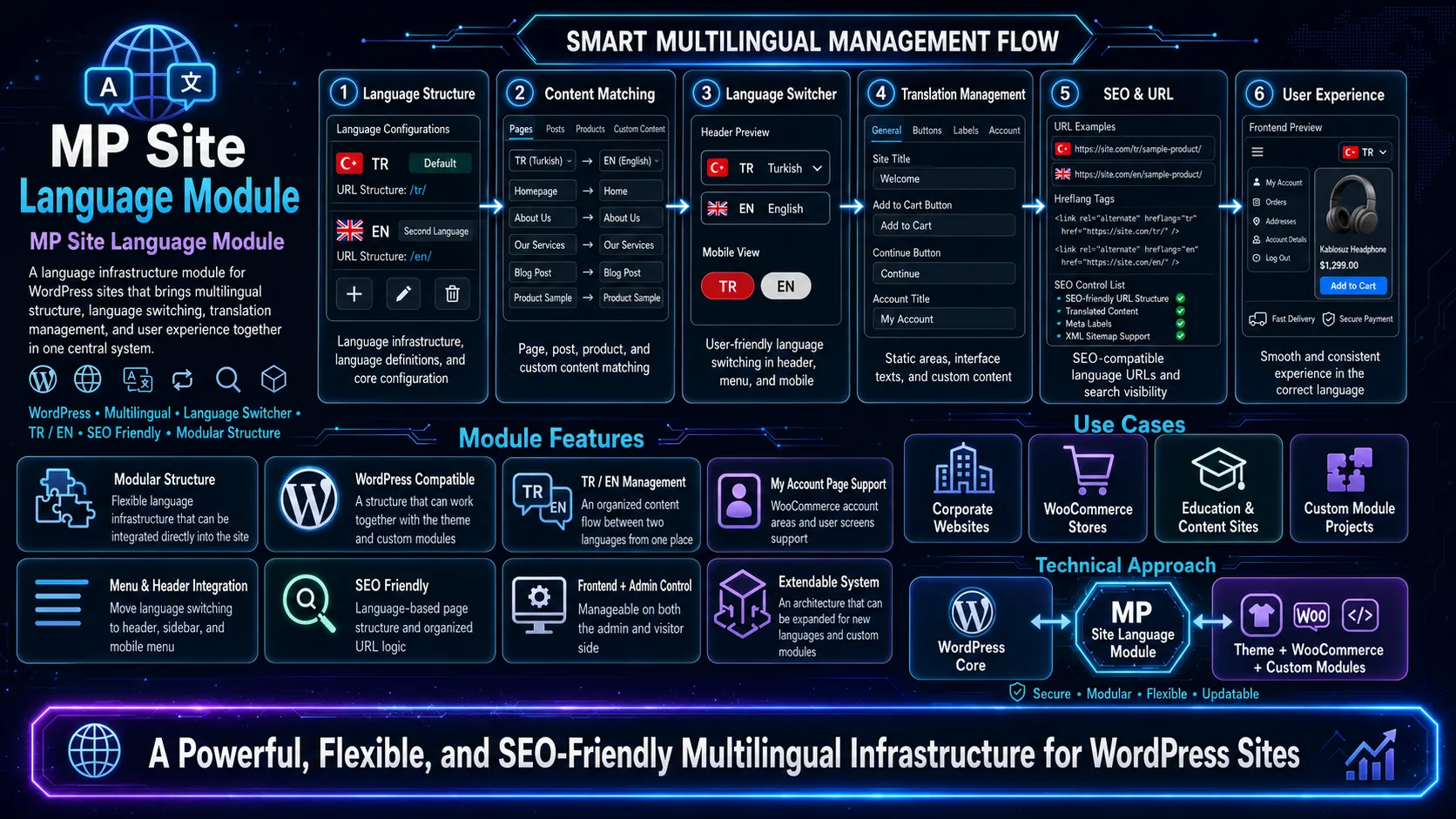
Description
This document has been prepared to present the developed language module not only as a technical plugin, but as a product that provides conversion, user experience, management convenience, SEO visibility, and international sales capacity.
The text covers real usage areas such as the homepage, feature pages, product/single pages, category pages, search, 404, My Account, login/OTP flows, and WooCommerce endpoints. It also includes ready-to-use text frameworks that can be used for sales presentations, proposal files, landing pages, product introduction pages, and custom page content.
1. Short summary of the module
MP Language Module is an advanced language infrastructure developed to professionally manage multiple languages on a single WordPress installation, bringing content translation, short text/term translation, URL routing logic, WooCommerce integration, gettext compatibility, and admin panel tools under one roof.
This module differs from the classic “only translates posts” approach. It does not only offer post and page translation; it also includes critical areas such as categories, tags, product category/tag structures, menu labels, product attribute labels, product attribute values, search URL structure, 404 flow, static homepage, login redirects, and WooCommerce My Account endpoints within the language logic.
- Multi-language management in a single WordPress installation
- An architecture that correctly separates content translation from interface translation
- Management of fixed interface texts with WordPress gettext (.po/.mo) support
- Advanced content and term/string translation layer through custom tables
- URL and redirect infrastructure compatible with WordPress and WooCommerce page flows
- A performance-focused structure that activates in foreign languages and does not add load to the default language
2. Why is this module valuable?
Many multilingual solutions make the site heavier as soon as they are installed, complicate the admin experience, or start conflicting with URLs, WooCommerce, and custom modules. This module, however, was designed in a more targeted way because it was born from real field needs.
- It is compatible with a modular WordPress architecture that works within a single theme.
- It handles content, interface texts, and short DB strings in different layers.
- It especially covers products, categories, attributes, and account areas on the WooCommerce side.
- It offers not only translation, but also manageability, sustainability, and growth logic.
- When a new language is added, the system can expand naturally.
3. Core architectural approach
3.1 Content translation
For post, page, product, and other defined content types, the title, slug, excerpt, content, and status information are stored in a separate content translation layer. In this way, the target-language version of a content item is managed independently from, but still related to, the source content.
3.2 Term and short string translation
Short texts such as categories, tags, product categories/tags, menu labels, product attribute labels, and product attribute terms are stored in a separate term/string translation layer. This design makes it easier to manage short but critical texts that live in the database.
3.3 Gettext layer
WordPress’s native gettext system is used for fixed interface texts. This allows buttons, headings, short redirect texts, form labels, and static in-theme sentences to be translated through the .po/.mo structure.
3.4 URL and context layer
Language exists not only in text, but also in URLs, endpoints, search, redirects, and page matching. This module aims to read the language context through URL prefix logic and behave consistently on the front page, search, 404, internal links, and Woo endpoints.
4. What does it offer on the admin panel side?
The language module is not only a frontend solution. It includes a real admin panel logic and also considers the editor/developer side.
- Language Settings screen
- Management of active languages
- Default language selection
- Selection of translatable post types
- Cache on/off control
- Content Translations list
- Single translation edit screen
- Term / String Translations screen
- Product attribute label and term management
5. Areas it covers on the site
One of the strongest selling points of this module is that it covers not only a few pages, but the general behavior of the site.
5.1 Homepage
In structures that use a static homepage, the default language and foreign-language root URLs work consistently. For example, while the root URL remains normal in the default language, the version opened with a prefix such as /en/ in a foreign language is correctly matched to the target homepage.
This is critical from a marketing perspective because the homepage is usually the most visible and most visited page on a multilingual site.
5.2 Content pages
For core content types such as page, post, and product, the target-language title, content area, excerpt, and slug can be managed. This provides not only title translation, but a real language-based page experience.
5.3 Category and tag pages
Post categories, post tags, product categories, and product tags can be translated. This allows archive pages in blog and e-commerce structures to appear more natural in the target language.
5.4 Product pages
WooCommerce products can be moved into the target-language experience not only at the title and description level, but also together with product categories, tag structure, and product attribute fields.
5.5 Product attributes
The ability to translate product attribute labels and attribute values separates the module from a standard language solution on the e-commerce side. For example, the 'Color' label and the 'Red' value can both be moved into the target language.
5.6 Search
Search pages do not merely work; they become more professional with correct URL logic, language switcher compatibility, and clean redirects.
5.7 404 and special state pages
The 404 flow can work separately in the default language and foreign languages. This is important so the user experience does not break.
5.8 Login, OTP, and redirect flows
AJAX-based login, OTP, and resend messages can return in the target language. After login, users can be redirected within the language context they are currently using.
5.9 My Account and Woo endpoints
The WooCommerce My Account page and its sub-endpoints can also be preserved within the language context. Maintaining endpoint logic for areas such as orders, downloads, and account details demonstrates the practical maturity of the module.
6. Strong points from a marketing perspective
This module is not only a technical solution aimed at developers. When explained correctly, it directly creates commercial advantage.
- It makes it easier to enter new markets.
- It enables reaching different user segments on the same site.
- It contributes to a more professional and international brand image.
- It makes category, product, and search experiences consistent in the target language.
- It increases customer trust and can positively affect conversion rates, especially in e-commerce.
- It lowers maintenance costs by separating content and interface translation.
7. Promotional text that can be used on the homepage
The following texts can be used on the homepage, in product introduction areas, or in hero section areas.
7.1 Short hero text
A professional multilingual infrastructure that works on a single WordPress installation. Manage content translations, category and menu labels, WooCommerce product attributes, URL redirects, and search behavior within one system.
7.2 Medium-length sales text
MP Language Module is a professional multilingual system developed for WordPress and WooCommerce projects, managing content and interface translation in the right place. Page translations, category and tag structures, menu texts, product attributes, custom URL flows, search pages, 404 scenarios, and account areas are managed from a single center.
7.3 Conversion-focused CTA text
Make your site multilingual, more professional, and more scalable on a single installation.
- View Live Preview
- Explore Features
- See the Multilingual Structure
- Request a Demo
8. Ready headings for the features page
- Single Installation, Multi-Language Experience
- Manage Content and Interface Translation in the Right Place
- Real Compatibility with WooCommerce
- Full Control in Category, Menu, and Attribute Translations
- Consistency in URL, Search, and 404 Behavior
- High Manageability, Low Complexity
9. Recommended usage scenarios for single and custom pages
9.1 Product detail page
The product title, description, short description, category relationships, attribute labels, and attribute values can be presented in the target language. This makes the product page feel not only translated, but truly prepared for that market.
9.2 Blog/single content page
Blog content can be managed with separate titles and content in the target language. This takes translation beyond a superficial level in terms of SEO and user experience.
9.3 Category archives
Category and tag pages can open with more natural names in the target language. This allows users to browse archive screens in their own language as well.
9.4 Search page
The search experience does not merely work; it becomes more professional with correct URL logic, language switcher compatibility, and clean redirects.
9.5 My Account, login, and security flow
Login, OTP, error messages, success messages, and redirects can proceed in the target language. For e-commerce sites, this creates an important difference in terms of trust and usability.
9.6 404 and custom error experience
Directing foreign-language users to a real 404 flow instead of a blank white page significantly increases the perception of quality.
10. SEO and URL strategy
The module’s URL logic does not leave the language experience only in the content. Thanks to the prefix approach, target-language URLs are managed in a more controlled way.
- The default language can be kept without a prefix.
- Foreign languages can be separated with a clear prefix such as /en/.
- With translated slug logic, content URLs can become readable in the target language.
- Search, front page, and some custom routes can be gathered under a single logic.
11. Performance approach
One important advantage of the language module is that it does not blindly perform heavy operations on every request. Not activating the translation layer unnecessarily in the default language, and using cache and request-level map logic in foreign languages, provides a more balanced structure in terms of performance.
- Minimum additional load in the default language
- Targeted lookup in foreign languages
- Request-level map/cache approach
- Separated data model in term and content layers
12. Why does it make sense to use a custom-developed module?
General-purpose multilingual plugins on the market often solve standard scenarios; however, when theme-specific modules, WooCommerce customizations, OTP login flows, product attribute structures, custom admin screens, and custom route solutions come into play, they may fall short.
Because this module is developed directly according to the theme architecture in use and real business needs, it progresses in a more controlled, more flexible, and more reliable way.
13. Who is it suitable for?
- WooCommerce-based multilingual stores
- Corporate WordPress sites
- Projects using blog + product structures on the same site
- Brands targeting multiple markets on a single installation
- Custom WordPress projects using their own theme/module infrastructure
14. Key technical and commercial gains
- Separated translation layers
- Manageability from the admin panel
- Broad coverage in WooCommerce areas
- Consistency in search, 404, and URL behavior
- Controlled redirects on custom pages and endpoints
- A clear and strong sales story that can be used on marketing pages
15. Long product description that can be used on the site
MP Language Module is a professional multilingual infrastructure developed for WordPress and WooCommerce. Working on a single installation, this structure manages page, post, and product translations while also covering category, tag, menu texts, product attribute labels, product attribute values, and custom route behavior. It also includes the parts that many systems overlook—such as search experience, 404 flow, login and OTP messages, redirect URLs, and WooCommerce My Account areas—within the language context. As a result, users encounter not only translated texts, but a holistic target-language experience.
This module correctly separates content translation from interface translation. While long-form content is managed in a custom content table, fixed interface texts proceed through the WordPress gettext structure. Short database strings and terms are handled in a separate term/string layer. As a result, the system becomes more sustainable technically and more manageable editorially.
16. Frequently asked questions
Does this module work on a single WordPress installation?
Yes. The structure is designed for multi-language management on a single installation.
Does it only translate pages and posts?
No. It also covers categories, tags, menus, product attribute labels, product attribute values, and various custom flows.
Is it compatible with WooCommerce?
Yes. It has been extended to cover products, categories, attributes, My Account flow, and many WooCommerce behaviors.
Is it difficult to add a new language?
No. Thanks to the active language logic and admin panel management, adding a new language can be done in a controlled way.
Will there be a performance issue in the default language?
The architecture is designed to avoid adding unnecessary load in the default language.
MP Language Module is a professional solution that aims to create not only translation, but also structure, consistency, management convenience, and commercial value in multilingual WordPress projects.
If the goal is not merely to translate a few texts, but to build a consistent and scalable language experience from the homepage to the product page, from search to login flows, from category screens to the My Account page, this module provides a strong foundation.
This file can be used directly or adapted for homepage texts, feature pages, proposal presentations, investor/business partnership introductions, sales pages, and product brochures.